


[Aug 11, 2026] Latest 100-150 Exam with Accurate Cisco Certified Support Technician (CCST) Networking PDF Questions
Practice To 100-150 - Test4Engine Remarkable Practice On your Cisco Certified Support Technician (CCST) Networking Exam
NEW QUESTION # 54
During the data encapsulation process, which OSI layer adds a header that contains MAC addressing information and a trailer used for error checking?
- A. Data Link
- B. Network
- C. Transport
- D. Session
Answer: A
Explanation:
The Data Link layer adds the MAC address header and a trailer containing the frame check sequence for error detection.
NEW QUESTION # 55
A user at your company cannot connect to websites on the internet. However, they can connect to network resources on the company LAN.
You want to use the divide-and-conquer approach to troubleshoot the issue.
What should you do first?
- A. Check the computer's cable connections.
- B. Run the Telnet command from the user's computer.
- C. Check the computer's network adapter.
- D. Ping the default gateway from the user's computer.
Answer: D
Explanation:
The divide-and-conquer method starts testing in the middle of the stack to quickly narrow the problem. Pinging the default gateway checks whether the user can reach beyond the local host to the local network boundary. Since the user can access LAN resources but not internet websites, this is the best first step to determine whether the issue is on the local side or farther upstream.
NEW QUESTION # 56
Which protocol allows you to securely upload files to another computer on the internet?
- A. SFTP
- B. ICMP
- C. HTTP
- D. NTP
Answer: A
Explanation:
SFTP, or Secure File Transfer Protocol, is a protocol that allows for secure file transfer capabilities between networked hosts. It is a secure extension of the File Transfer Protocol (FTP). SFTP encrypts both commands and data, preventing passwords and sensitive information from being transmitted openly over the network. It is typically used for secure file transfers over the internet and is built on the Secure Shell (SSH) protocol1.
Reference: =
* What Is SFTP? (Secure File Transfer Protocol)
* How to Use SFTP to Safely Transfer Files: A Step-by-Step Guide
* Secure File Transfers: Best Practices, Protocols And Tools
The Secure File Transfer Protocol (SFTP) is a secure version of the File Transfer Protocol (FTP) that uses SSH (Secure Shell) to encrypt all commands and data. This ensures that sensitive information, such as usernames, passwords, and files being transferred, are securely transmitted over the network.
* ICMP (Internet Control Message Protocol) is used for network diagnostics and is not designed for file transfer.
* NTP (Network Time Protocol) is used to synchronize clocks between computer systems and is not related to file transfer.
* HTTP (HyperText Transfer Protocol) is used for transmitting web pages over the internet and does not inherently provide secure file transfer capabilities.
Thus, the correct protocol that allows secure uploading of files to another computer on the internet is SFTP.
Reference: =
* Cisco Learning Network
* SFTP Overview (Cisco)
NEW QUESTION # 57
Hotspot Question
You plan to use a network firewall to protect computers at a small office.
For each statement about the output, select True or False.
Note: You will receive partial credit for each correct selection.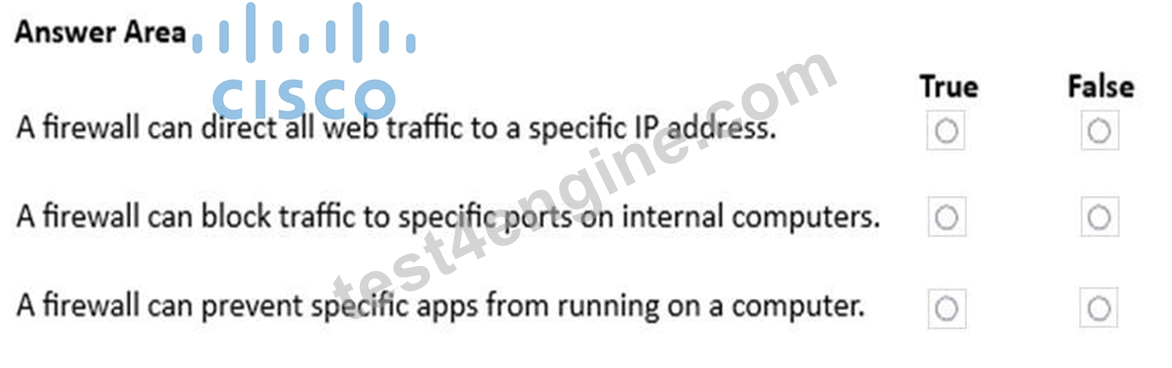
Answer:
Explanation: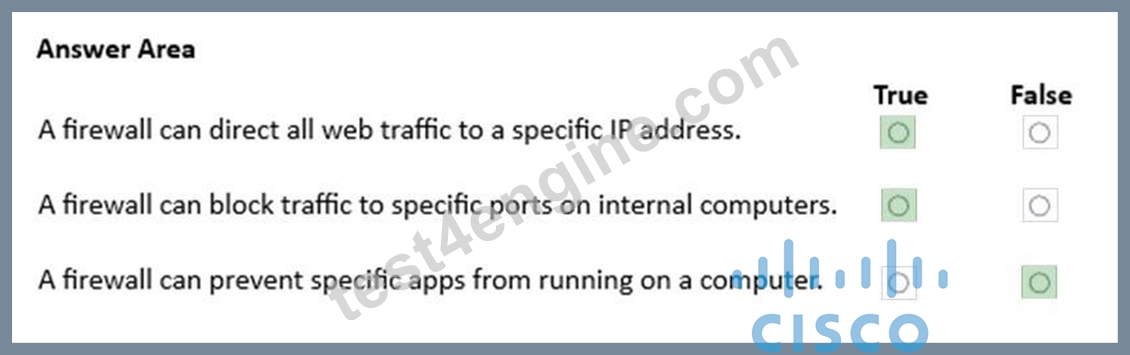
Explanation:
A firewall can direct all web traffic to a specific IP address. - True
Firewalls support destination NAT (port forwarding) to reroute incoming web requests to a designated internal server.
A firewall can block traffic to specific ports on internal computers. - True Firewalls enforce access control lists that can deny traffic based on port numbers to protect hosts.
A firewall can prevent specific apps from running on a computer. - False Firewalls control network traffic, not the execution of applications on endpoints.
NEW QUESTION # 58
HOTSPOT
Computers in a small office are unable to access companypro.net. You run the ipconfig command on one of the computers.
The results are shown in the exhibit.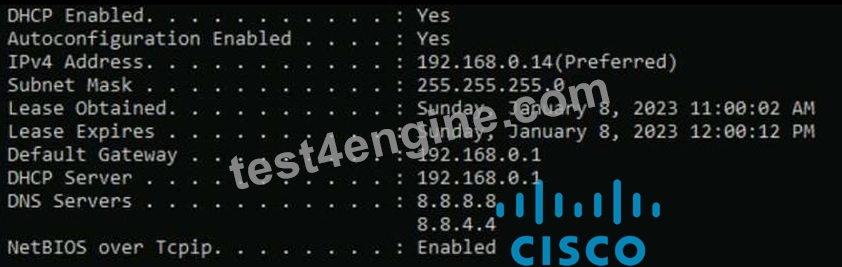
You need to determine if you can reach the router.
Which command should you use? Complete the command by selecting the correct options from each drop-down lists.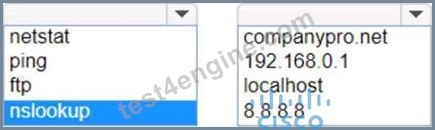
Answer:
Explanation: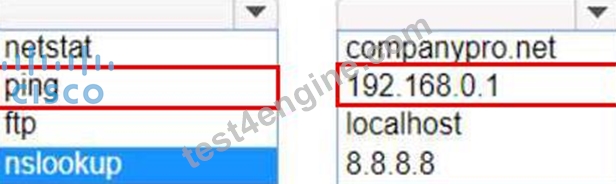
Explanation:
To determine if you can reach the router, you should use the ping command followed by the IP address of the router. The ping command is a network utility used to test the reachability of a host on an Internet Protocol (IP) network and to measure the round-trip time for messages sent from the originating host to a destination computer.
The Default Gateway in the ipconfig results is typically the router's IP address in a home or small office network. In this case, the Default Gateway is 192.168.0.1, which is the address you would ping to check connectivity to the router.
Reference: =
How to Use the Ping Command
Testing Network Connectivity with the Ping Command
To determine if you can reach the router, you should use the ping command with the IP address of the router.
Command: ping
Target: 192.168.0.1
So, the completed command is:
ping 192.168.0.1
Step by Step Comprehensive and Detailed Explanation.
ping: The ping command sends ICMP Echo Request messages to the target IP address and waits for an Echo Reply. It is commonly used to test the reachability of a network device.
192.168.0.1: This is the IP address of the default gateway (the router) as shown in the ipconfig output. Pinging this address will help determine if the computer can communicate with the router.
Reference: Using the ping Command: ping Command Guide
NEW QUESTION # 59
Which protocol is used by IPv6-enabled hosts to perform automatic stateless address configuration?
- A. ICMPv6
- B. TFTP
- C. DHCPv6
- D. DNS
Answer: A
Explanation:
Stateless address autoconfiguration in IPv6 relies on ICMPv6 through Neighbor Discovery messages. These messages allow a host to learn network prefix information from routers and automatically create its own IPv6 address without requiring stateful address assignment.
NEW QUESTION # 60
A host is given the IP address 172.16.100.25 and the subnet mask 255.255.252.0.
What is the CIDR notation for this address?
- A. 172.16.100.25 /22
- B. 172.16.100.25 /21
- C. 172.16.100.25 /20
- D. 172.16.100.25 /23
Answer: A
Explanation:
The CIDR (Classless Inter-Domain Routing) notation for the subnet mask 255.255.252.0 is /22. This notation indicates that the first 22 bits of the IP address are used for network identification, and the remaining bits are used for host addresses within the network1.
References :=
*Subnet Cheat Sheet - 24 Subnet Mask, 30, 26, 27, 29, and other IP Address CIDR Network References
*Subnet Mask to CIDR Notation: The given subnet mask is 255.255.252.0. To convert this to CIDR notation:
*Convert the subnet mask to binary: 11111111.11111111.11111100.00000000
*Count the number of consecutive 1s in the binary form: There are 22 ones.
*Therefore, the CIDR notation is /22.
References:
*Understanding Subnetting and CIDR: Cisco CIDR Guide
NEW QUESTION # 61
DRAG DROP
Move the MFA factors from the list on the left to their correct examples on the right. You may use each factor once, more than once, or not at all.
Note: You will receive partial credit for each correct selection.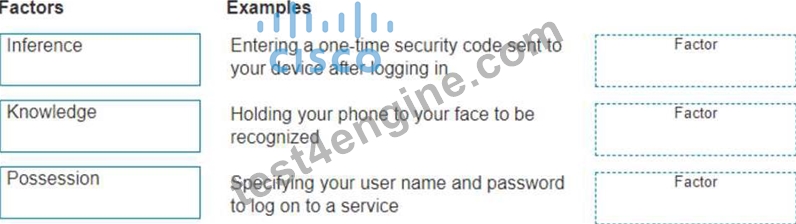
Answer:
Explanation: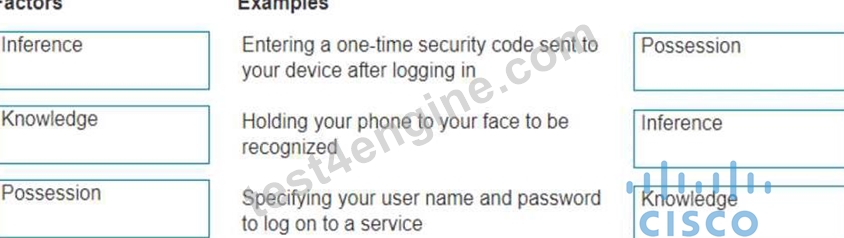
Explanation:
The correct matching of the MFA factors to their examples is as follows:
Entering a one-time security code sent to your device after logging in: Possession
Holding your phone to your face to be recognized: Inherence
Specifying your user name and password to log on to a service: Knowledge
Here's why each factor matches the example:
Possession: This factor is something the user has, like a mobile device. A one-time security code sent to this device falls under this category.
Inherence: This factor is something the user is, such as a biometric characteristic. Facial recognition using a phone is an example of this factor.
Knowledge: This factor is something the user knows, like a password or PIN.
Multi-Factor Authentication (MFA) enhances security by requiring two or more of these factors to verify a user's identity before granting access.
Entering a one-time security code sent to your device after logging in.
Factor: Possession
This factor relates to something you have, such as a device that receives a security code.
Holding your phone to your face to be recognized.
Factor: Inference (typically referred to as Inherence or Biometric)
This factor relates to something you are, such as biometric authentication like facial recognition.
Specifying your username and password to log on to a service.
Factor: Knowledge
This factor relates to something you know, such as a username and password.
Possession Factor: This involves something the user has in their possession. Receiving a one-time security code on a device (e.g., phone) is an example of this.
Inference Factor (Inherence/Biometric): This involves something inherent to the user, such as
biometric verification (e.g., facial recognition or fingerprint scanning).
Knowledge Factor: This involves something the user knows, such as login credentials (username and password).
Reference: Multi-Factor Authentication (MFA) Explained: MFA Guide
Understanding Authentication Factors: Authentication Factors
NEW QUESTION # 62
Move each cloud computing service model from the list on the left to the correct example on the right Note: You will receive partial credit for each correct answer.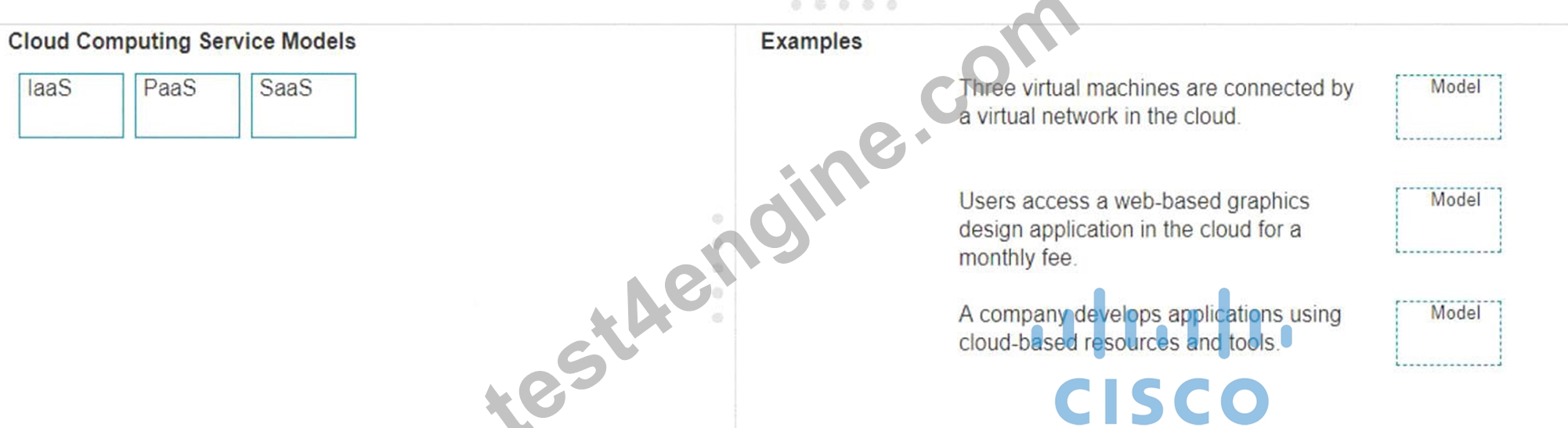
Answer:
Explanation: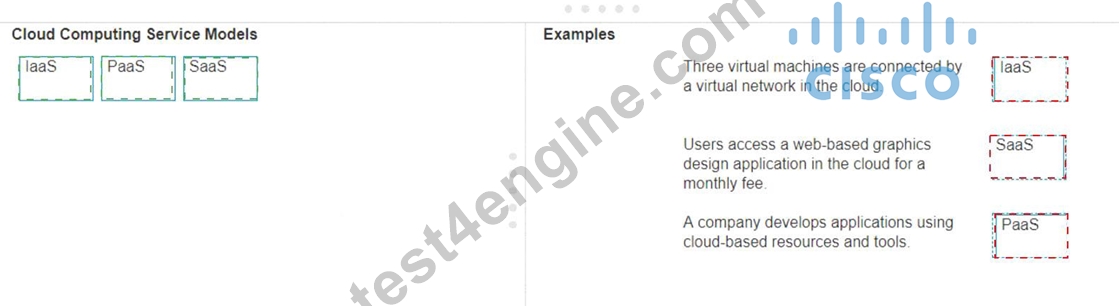
Explanation:
* Three virtual machines are connected by a virtual network in the cloud.
* Model: IaaS (Infrastructure as a Service)
* Explanation: IaaS provides virtualized computing resources over the internet, including virtual machines, storage, and networks.
* Users access a web-based graphics design application in the cloud for a monthly fee.
* Model: SaaS (Software as a Service)
* Explanation: SaaS delivers software applications over the internet, typically on a subscription basis, accessible via a web browser.
* A company develops applications using cloud-based resources and tools.
* Model: PaaS (Platform as a Service)
* Explanation: PaaS provides a platform allowing customers to develop, run, and manage applications without dealing with the infrastructure.
* IaaS (Infrastructure as a Service): Provides virtualized hardware resources that customers can use to build their own computing environments.
* PaaS (Platform as a Service): Offers a platform with tools and services to develop, test, and deploy applications.
* SaaS (Software as a Service): Delivers fully functional applications over the internet that users can access and use without managing the underlying infrastructure.
References:
* Cloud Service Models: Understanding IaaS, PaaS, SaaS
* NIST Definition of Cloud Computing: NIST Cloud Computing
NEW QUESTION # 63
Drag and Drop Question
Move the security options from the list on the left to its characteristic on the right. You may use each security option once, more than once, or not at all.
Note: You will receive partial credit for each correct answer.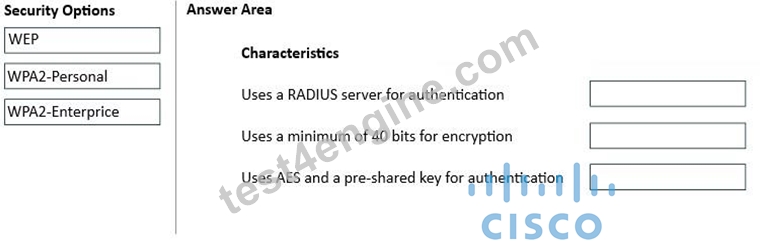
Answer:
Explanation: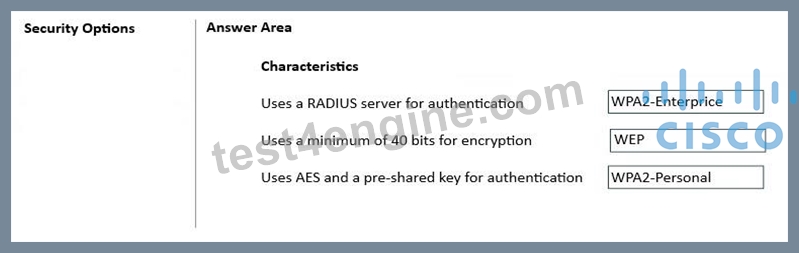
NEW QUESTION # 64
Your company has 20 Cisco switches throughout its building.
You need to view the configuration of each switch from the command line.
Which protocol should you use?
- A. RDP
- B. FTP
- C. SNMP
- D. SMTP
Answer: C
Explanation:
SNMP is used to monitor and retrieve management information from network devices such as switches. It allows an administrator to view device configuration and status information remotely from the command line through a network management system or SNMP tools.
NEW QUESTION # 65
Evaluate the graphic.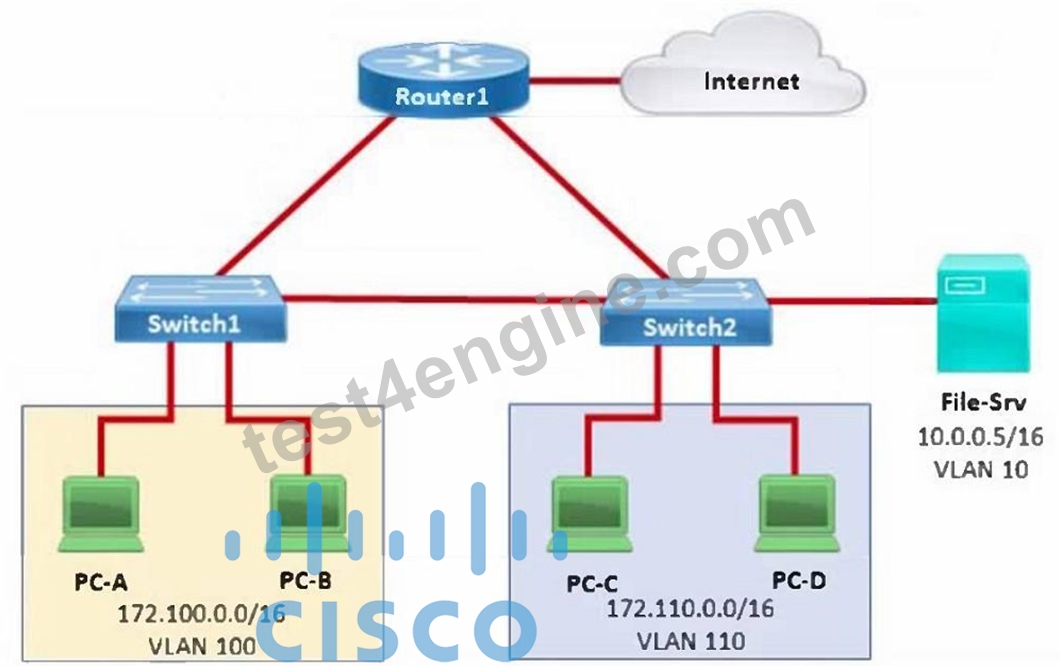
While making a configuration change to Router1, a junior technician accidentally reboots the router.
Which two statements are true about the impact to communication on the network while the router is temporarily offline? (Choose two.)
- A. PC-A, PC-B, PC-C, and PC-D can all still communicate with each other.
- B. PC-A and PC-B can still communicate with each other.
- C. The file server (File-Srv) can still access the Internet.
- D. None of the PCs can access the file server (File-Srv).
- E. PC-C and PC-D can still communicate with the file server (File-Srv).
Answer: B,D
Explanation:
Communication between different VLANs requires Router1, so without the router, no PC can reach the file server in VLAN 10. Devices in the same VLAN can still communicate at Layer 2 through the switch, so PC-A and PC-B can still communicate with each other.
NEW QUESTION # 66
Move the MFA factors from the list on the left to their correct examples on the right. You may use each factor once, more than once, or not at all.
Note: You will receive partial credit for each correct selection.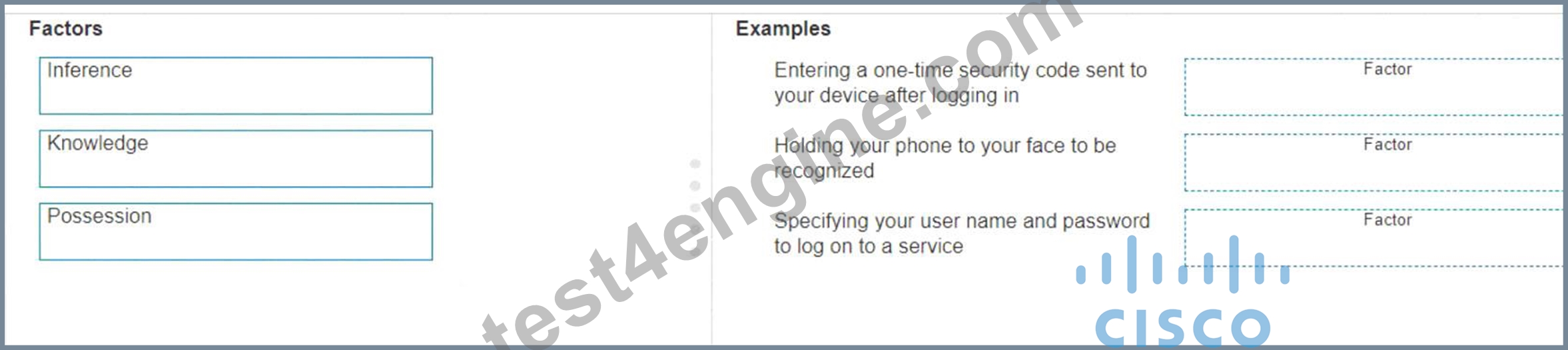
Answer:
Explanation: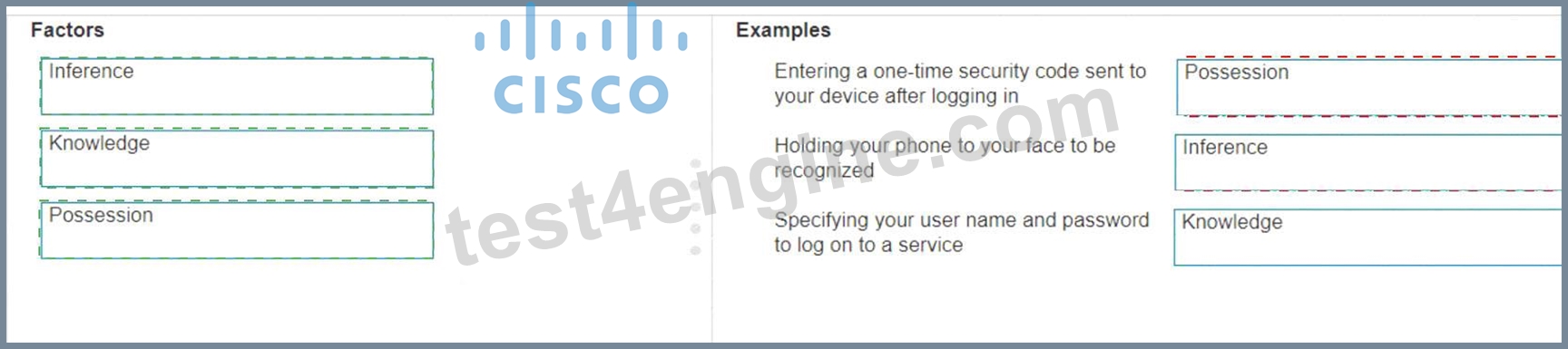
Explanation:
The correct matching of the MFA factors to their examples is as follows:
* Entering a one-time security code sent to your device after logging in: Possession
* Holding your phone to your face to be recognized: Inherence
* Specifying your user name and password to log on to a service: Knowledge Here's why each factor matches the example:
* Possession: This factor is something the user has, like a mobile device. A one-time security code sent to this device falls under this category.
* Inherence: This factor is something the user is, such as a biometric characteristic. Facial recognition using a phone is an example of this factor.
* Knowledge: This factor is something the user knows, like a password or PIN.
Multi-Factor Authentication (MFA) enhances security by requiring two or more of these factors to verify a user's identity before granting access.
* Entering a one-time security code sent to your device after logging in.
* Factor: Possession
* Explanation: This factor relates to something you have, such as a device that receives a security code.
* Holding your phone to your face to be recognized.
* Factor: Inference (typically referred to as Inherence or Biometric)
* Explanation: This factor relates to something you are, such as biometric authentication like facial recognition.
* Specifying your username and password to log on to a service.
* Factor: Knowledge
* Explanation: This factor relates to something you know, such as a username and password.
* Possession Factor: This involves something the user has in their possession. Receiving a one-time security code on a device (e.g., phone) is an example of this.
* Inference Factor (Inherence/Biometric): This involves something inherent to the user, such as biometric verification (e.g., facial recognition or fingerprint scanning).
* Knowledge Factor: This involves something the user knows, such as login credentials (username and password).
References:
* Multi-Factor Authentication (MFA) Explained: MFA Guide
* Understanding Authentication Factors: Authentication Factors
NEW QUESTION # 67
Which protocol does an IPv6 host use to resolve the MAC address associated with a destination IPv6 address?
- A. Cisco Discovery Protocol (CDP)
- B. Dynamic Host Configuration Protocol (DHCP)
- C. Address Resolution Protocol (ARP)
- D. Neighbor Discovery Protocol (NDP)
Answer: D
Explanation:
IPv6 uses Neighbor Discovery Protocol to discover the Layer 2 address of a destination on the local network. It replaces the ARP function used in IPv4 by using ICMPv6 messages to map an IPv6 address to a MAC address.
NEW QUESTION # 68
Which network technology is not impacted by electromagnetic and radio wave interference?
- A. Twisted pair
- B. Copper
- C. Wireless
- D. Fiber
Answer: D
Explanation:
Fiber transmits data as light rather than electrical signals, so it is not affected by electromagnetic or radio frequency interference.
NEW QUESTION # 69
A user reports that a company website is not available. The help desk technician issues a tracert command to determine if the server hosting the website is reachable over the network. The output of the command is shown as follows: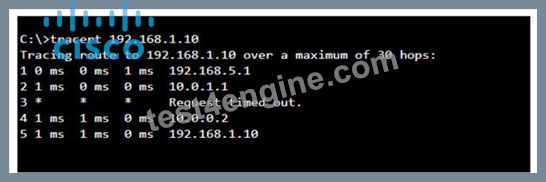
What can you tell from the command output?
- A. Requests to the web server at 192.168.1.10 are being delayed and time out.
- B. The router at hop 3 is not forwarding packets to the IP address 192.168.1.10.
- C. The server with the address 192.168.1.10 is reachable over the network.
- D. The server address 192.168.1.10 is being blocked by a firewall on the router at hop 3.
Answer: C
Explanation:
The tracert command output shows the path taken to reach the destination IP address, 192.168.1.10. The command output indicates:
*Hops 1 and 2 are successfully reached.
*Hop 3 times out, meaning the router at hop 3 did not respond to the tracert request. However, this does not necessarily indicate a problem with forwarding packets, as some routers may be configured to block or not respond to ICMP requests.
*Hops 4 and 5 are successfully reached, with hop 5 being the destination IP 192.168.1.10, indicating that the server is reachable.
Thus, the correct answer is C. The server with the address 192.168.1.10 is reachable over the network.
References :=
*Cisco Traceroute Command
*Understanding Traceroute
The tracert command output indicates that the server with the address 192.168.1.10 is reachable over the network. The asterisk (*) at hop 3 suggests that the probe sent to that hop did not return a response, which could be due to a variety of reasons such as a firewall blocking ICMP packets or the router at that hop being configured not to respond to ICMP requests. However, since the subsequent hops (4 and 5) are showing response times, it means that the packets are indeed getting through and the server is reachable12.
References :=
*How to Use Traceroute Command to Read Its Results
*How to Use the Tracert Command in Windows
NEW QUESTION # 70
Which wireless standard operates on both 2.4 GHz and 5 GHz frequencies and offers improved performance compared to older standards?
- A. 802.11a
- B. 802.11b
- C. 802.3
- D. 802.11n
Answer: D
Explanation:
802.11n supports dual-band operation and uses technologies like MIMO to improve speed and range, making it more efficient than earlier wireless standards.
NEW QUESTION # 71
DRAG DROP
Move each cloud computing service model from the list on the left to the correct example on the right. Note: You will receive partial credit for each correct answer.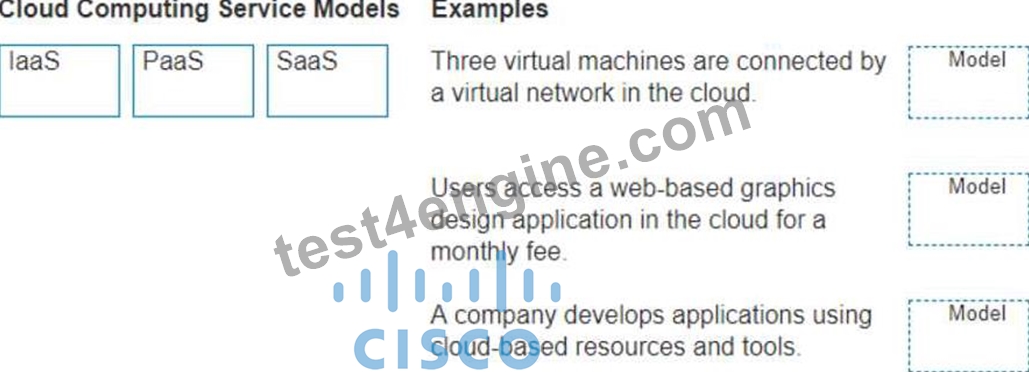
Answer:
Explanation: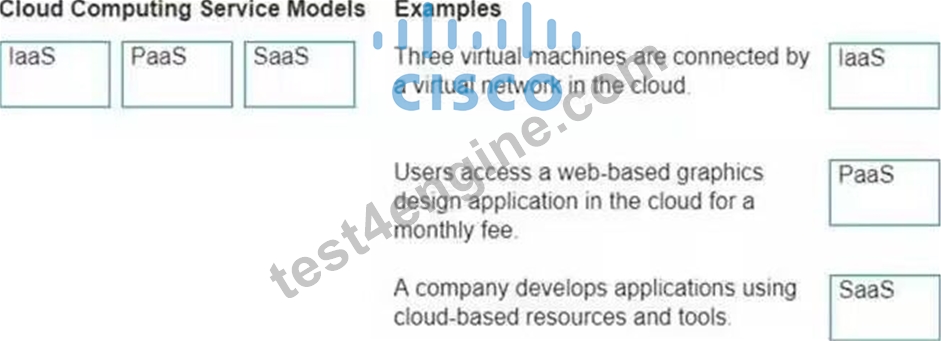
Explanation:
Three virtual machines are connected by a virtual network in the cloud.
Model: IaaS (Infrastructure as a Service)
IaaS provides virtualized computing resources over the internet, including virtual machines, storage, and networks.
Users access a web-based graphics design application in the cloud for a monthly fee.
Model: SaaS (Software as a Service)
SaaS delivers software applications over the internet, typically on a subscription basis, accessible via a web browser.
A company develops applications using cloud-based resources and tools. Model: PaaS (Platform as a Service)
PaaS provides a platform allowing customers to develop, run, and manage applications without dealing with the infrastructure.
IaaS (Infrastructure as a Service): Provides virtualized hardware resources that customers can use to build their own computing environments.
PaaS (Platform as a Service): Offers a platform with tools and services to develop, test, and deploy applications.
SaaS (Software as a Service): Delivers fully functional applications over the internet that users can access and use without managing the underlying infrastructure.
Reference: Cloud Service Models: Understanding IaaS, PaaS, SaaS
NIST Definition of Cloud Computing: NIST Cloud Computing
NEW QUESTION # 72
Drag and Drop Question
Move each cloud computing service model from the list on the left to the correct example on the right.
Note: You will receive partial credit for each correct answer.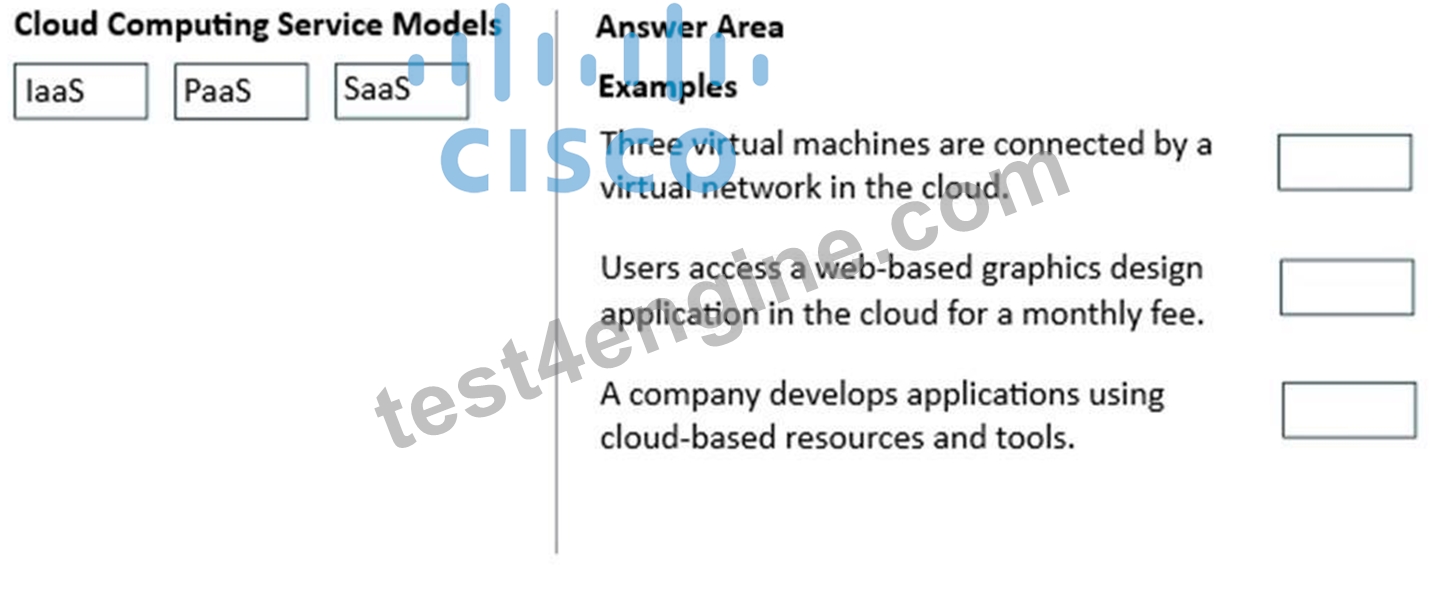
Answer:
Explanation: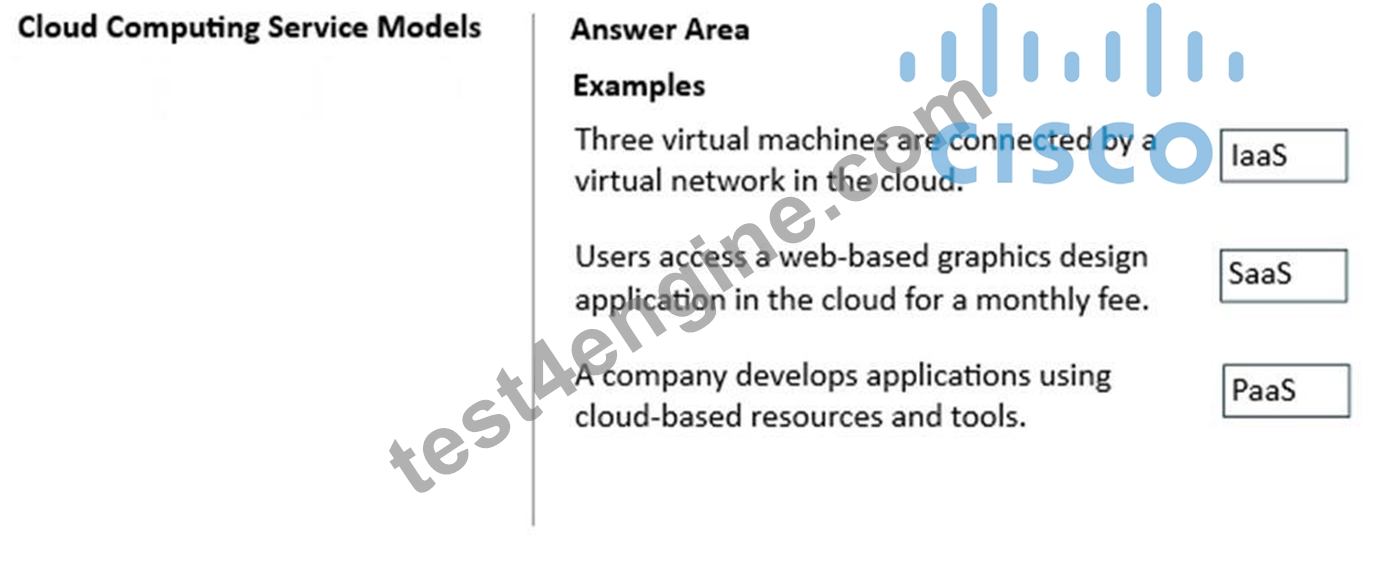
NEW QUESTION # 73
Which address is included in the 192.168.200.0/24 network?
- A. 192.168.201.13
- B. 192.168.200.13
- C. 192.168.1.13
- D. 192.168.199.13
Answer: B
Explanation:
192.168.200.13 falls within the 192.168.200.0-192.168.200.255 range defined by the /24 network.
NEW QUESTION # 74
In the network shown in the following graphic, Switch1 is a Layer 2 switch.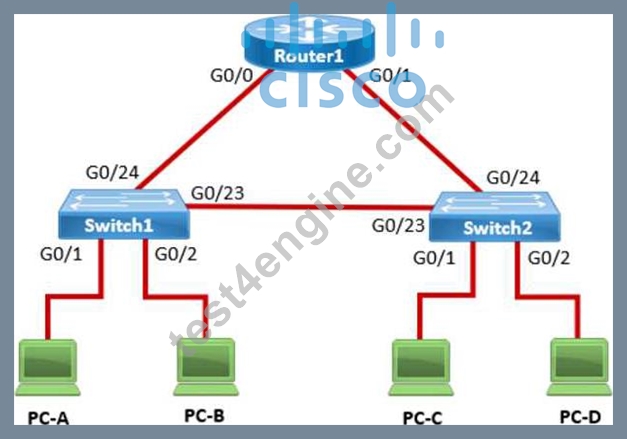
PC-A sends a frame to PC-C. Switch1 does not have a mapping entry for the MAC address of PC-C.
Which action does Switch1 take?
- A. Switch1 queries Switch2 for the MAC address of PC-C.
- B. Switch1 floods the frame out all active ports except port G0/1.
- C. Switch1 sends an ARP request to obtain the MAC address of PC-
- D. Switch1 drops the frame and sends an error message back to PC-
Answer: D
Explanation:
In a network, when a Layer 2 switch (like Switch1) receives a frame destined for a MAC address that is not in its MAC address table, it performs a flooding operation. This means the switch will send the frame out of all ports except the port on which the frame was received. This flooding ensures that if the destination device is connected to one of the other ports, it will receive the frame and respond, allowing the switch to learn its MAC address.
A). Switch1 queries Switch2 for the MAC address of PC-C: This does not happen in Layer 2 switches; they do not query other switches for MAC addresses.
A). Switch1 drops the frame and sends an error message back to PC-A: This is not the default behavior for unknown unicast frames.
D). Switch1 sends an ARP request to obtain the MAC address of PC-C: ARP is used by devices to map IP addresses to MAC addresses, not by switches to find unknown MAC addresses.
Thus, the correct answer is
B). Switch1 floods the frame out all active ports except port G0/1.
Reference: =
Cisco Layer 2 Switching Overview
Switching Mechanisms (Cisco)
NEW QUESTION # 75
......
Exam Questions and Answers for 100-150 Study Guide Questions and Answers!: https://actualtests.test4engine.com/100-150-real-exam-questions.html