


XK0-005 Practice CompTIA Verified Answers - Pass Your Exams For Sure! [2023]
Valid Way To Pass Linux+'s XK0-005 Exam
CompTIA Linux+ certification is vendor-neutral, which means that it is not tied to any specific distribution of Linux. This makes it a valuable certification for IT professionals who work with multiple Linux distributions or who work in organizations that use different distributions. Earning the CompTIA Linux+ certification can help IT professionals advance their careers and increase their earning potential, as well as validate their knowledge and skills in Linux system administration.
NEW QUESTION # 31
A Linux administrator created a new file system. Which of the following files must be updated to ensure the filesystem mounts at boot time?
- A. /etc/filesystems
- B. /etc/sysctl
- C. /etc/nfsmount.conf
- D. /etc/fstab
Answer: D
Explanation:
The file that must be updated to ensure the filesystem mounts at boot time is /etc/fstab. This file contains information about the filesystems that are mounted automatically by the mount -a command, which is usually invoked during the system startup. The /etc/fstab file has six fields for each filesystem: device name, mount point, filesystem type, mount options, dump frequency, and pass number. To add a new filesystem to the /etc/fstab file, you need to specify these fields correctly and make sure the mount point directory exists.
The other options are not correct files for controlling persistent mount points of filesystems. The /etc/sysctl file is used to configure kernel parameters at runtime. The /etc/filesystems file is used to specify the order of filesystem types used by mount when no filesystem type is given. The /etc/nfsmount.conf file is used to set options for mounting NFS filesystems. Reference: Persistently mounting file systems; fstab(5) - Linux manual page
NEW QUESTION # 32
A Linux administrator is trying to remove the ACL from the file /home/user/dat a. txt but receives the following error message:
Given the following analysis: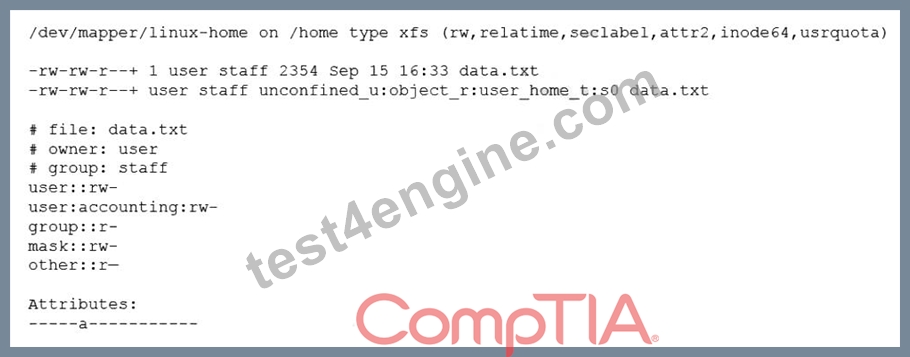
Which of the following is causing the error message?
- A. The filesystem is mounted with the wrong options.
- B. File attributes are preventing file modification.
- C. SELinux file context is denying the ACL changes.
- D. The administrator is not using a highly privileged account.
Answer: B
NEW QUESTION # 33
A server is experiencing intermittent connection issues. Some connections to the Internet work as intended, but some fail as if there is no connectivity. The systems administrator inspects the server configuration:
Which of the following is MOST likely the cause of the issue?
- A. An internal-only DNS server is configured.
- B. The IP netmask is wrong for ens3.
- C. The ARP table contains incorrect entries.
- D. Two default routes are configured.
Answer: D
Explanation:
The most likely cause of the issue is that two default routes are configured on the server. The default route is the route that is used when no other route matches the destination of a packet. The default route is usually the gateway that connects the local network to the Internet. The server configuration shows that there are two default routes in the routing table, one with the gateway 192.168.1.1 and the other with the gateway 10.0.0.1. This can cause a conflict and confusion for the server when deciding which gateway to use for the outgoing packets. Some packets may be sent to the wrong gateway and fail to reach the Internet, while some packets may be sent to the correct gateway and work as intended. This can result in intermittent connection issues and inconsistent behavior. The administrator should remove one of the default routes and keep only the correct one for the network. This can be done by using the ip route del command or by editing the network configuration files. This will resolve the issue and restore the connectivity. The other options are incorrect because they are not supported by the outputs. The DNS server, the IP netmask, and the ARP table are not the causes of the issue. Reference: CompTIA Linux+ (XK0-005) Certification Study Guide, Chapter 12: Managing Network Connections, pages 381-382.
NEW QUESTION # 34
A cloud engineer is installing packages during VM provisioning. Which of the following should the engineer use to accomplish this task?
- A. Bash
- B. Sidecar
- C. Cloud-init
- D. Docker
Answer: C
NEW QUESTION # 35
A Linux administrator copied a Git repository locally, created a feature branch, and committed some changes to the feature branch. Which of the following Git actions should the Linux administrator use to publish the changes to the main branch of the remote repository?
- A. push
- B. commit
- C. rebase
- D. tag
Answer: A
Explanation:
Explanation
The push action is used to publish the changes made in a local branch to a remote branch of a Git repository.
This action will update the remote branch with the commits made in the local branch and synchronize the two branches. The rebase action is used to reapply commits from one branch onto another branch, creating a linear history of commits. This action does not publish any changes to a remote repository. The tag action is used to create an annotated reference to a specific commit in a Git repository. This action does not publish any changes to a remote repository. The commit action is used to record changes made in the local repository and create a new snapshot of the project state. This action does not publish any changes to a remote repository. References: CompTIA Linux+ (XK0-005) Certification Study Guide, Chapter 20: Writing and Executing Bash Shell Scripts, page 579.
NEW QUESTION # 36
Which of the following tools is commonly used for creating CI/CD pipelines?
- A. Chef
- B. Jenkins
- C. Puppet
- D. Ansible
Answer: B
NEW QUESTION # 37
A systems administrator wants to be sure the sudo rules just added to /etc/sudoers are valid. Which of the following commands can be used for this task?
- A. sudo vi check
- B. test -f /etc/sudoers
- C. visudo -c
- D. cat /etc/sudoers | tee test
Answer: C
NEW QUESTION # 38
A systems administrator is troubleshooting connectivity issues and trying to find out why a Linux server is not able to reach other servers on the same subnet it is connected to. When listing link parameters, the following is presented:
Based on the output above, which of following is the MOST probable cause of the issue?
- A. The network interface eth0 is using an old kernel module.
- B. The network interface cable is not connected to a switch.
- C. The address ac:00:11:22:33:cd is not a valid Ethernet address.
- D. The Ethernet broadcast address should be ac:00:11:22:33:ff instead.
Answer: B
Explanation:
Explanation
The most probable cause of the connectivity issue is that the network interface cable is not connected to a switch. This can be inferred from the output of the ip link list dev eth0 command, which shows that the network interface eth0 has the NO-CARRIER flag set. This flag indicates that there is no physical link detected on the interface, meaning that the cable is either unplugged or faulty. The other options are not valid causes of the issue. The address ac:00:11:22:33:cd is a valid Ethernet address, as it follows the format of six hexadecimal octets separated by colons. The Ethernet broadcast address should be ff:ff:ff:ff:ff:ff, which is the default value for all interfaces. The network interface eth0 is not using an old kernel module, as it shows the UP flag, which indicates that the interface is enabled and ready to transmit data. References: CompTIA Linux+ (XK0-005) Certification Study Guide, Chapter 14: Managing Networking
NEW QUESTION # 39
A cloud engineer needs to remove all dangling images and delete all the images that do not have an associated container. Which of the following commands will help to accomplish this task?
- A. docker push images -a
- B. docker images prune -a
- C. docker rmi -a images
- D. docker images rmi --all
Answer: B
Explanation:
Explanation
The command docker images prune -a will help to remove all dangling images and delete all the images that do not have an associated container. The docker command is a tool for managing Docker containers and images. The images subcommand operates on images. The prune option removes unused images.
The -a option removes all images, not just dangling ones. A dangling image is an image that is not tagged and is not referenced by any container. This command will accomplish the task of cleaning up the unused images.
The other options are incorrect because they either do not exist (docker push images -a or docker images rmi
--all) or do not remove images (docker rmi -a images only removes images that match the name or ID of
"images"). References: CompTIA Linux+ (XK0-005) Certification Study Guide, Chapter 19: Managing Cloud and Virtualization Technologies, page 567.
NEW QUESTION # 40
A Linux administrator needs to expand a volume group using a new disk. Which of the following options presents the correct sequence of commands to accomplish the task?
- A. fdisk
partprobe
mkfs - B. partprobe
vgcreate
lvextend - C. fdisk
pvcreate
vgextend - D. lvcreate
fdisk
partprobe
Answer: C
NEW QUESTION # 41
A Linux administrator needs to obtain a list of all volumes that are part of a volume group. Which of the following commands should the administrator use to accomplish this task?
- A. lvs
- B. vgs
- C. fdisk -1
- D. pvs
Answer: D
NEW QUESTION # 42
A Linux systems administrator needs to copy files and directories from Server A to Server B.
Which of the following commands can be used for this purpose? (Select TWO)
- A. rsyslog
- B. ssh
- C. rsync
- D. reposync
- E. scp
- F. cp
Answer: C,E
NEW QUESTION # 43
A Linux systems administrator needs to copy files and directories from Server A to Server B. Which of the following commands can be used for this purpose? (Select TWO)
- A. rsyslog
- B. ssh
- C. rsync
- D. reposync
- E. scp
- F. cp
Answer: C,E
Explanation:
Explanation
The rsync and scp commands can be used to copy files and directories from Server A to Server B. Both commands can use SSH as a secure protocol to transfer data over the network. The rsync command can synchronize files and directories between two locations, using various options to control the copying behavior.
The scp command can copy files and directories between two hosts, using similar syntax as cp. The rsyslog command is used to manage system logging, not file copying. The cp command is used to copy files and directories within a single host, not between two hosts. The reposync command is used to synchronize a remote yum repository to a local directory, not copy files and directories between two hosts. References: CompTIA Linux+ (XK0-005) Certification Study Guide, Chapter 13: Networking Fundamentals, pages 440-441.
NEW QUESTION # 44
A cloud engineer is asked to copy the file deployment.yaml from a container to the host where the container is running. Which of the following commands can accomplish this task?
- A. docker cp container_id/deployment.yaml local://deployment.yaml
- B. docker cp deployment.yaml local://deployment.yaml
- C. docker cp container_id/deployment.yaml deployment.yaml
- D. docker cp container_id:/deployment.yaml deployment.yaml
Answer: D
Explanation:
The command docker cp container_id:/deployment.yaml deployment.yaml can accomplish the task of copying the file deployment.yaml from a container to the host. The docker command is a tool for managing Docker containers and images. The cp option copies files or directories between a container and the local filesystem. The container_id is the identifier of the container, which can be obtained by using the docker ps command. The /deployment.yaml is the path of the file in the container, which must be preceded by a slash. The deployment.yaml is the path of the file on the host, which can be relative or absolute. The command docker cp container_id:/deployment.yaml deployment.yaml will copy the file deployment.yaml from the container to the current working directory on the host. This is the correct command to use to accomplish the task. The other options are incorrect because they either use the wrong syntax (docker cp container_id/deployment.yaml deployment.yaml or docker cp container_id/deployment.yaml local://deployment.yaml) or do not exist (docker cp deployment.yaml local://deployment.yaml). Reference: CompTIA Linux+ (XK0-005) Certification Study Guide, Chapter 19: Managing Cloud and Virtualization Technologies, page 567.
NEW QUESTION # 45
A Linux administrator created the directory /project/access2all. By creating this directory, the administrator is trying to avoid the deletion or modification of files from non-owners. Which of the following will accomplish this goal?
- A. chmod +rws /project/access2all
- B. chmod 2770 /project/access2all
- C. chmod ugo+rwx /project/access2all
- D. chmod +t /project/access2all
Answer: D
Explanation:
Explanation
The command that will accomplish the goal of avoiding the deletion or modification of files from non-owners is chmod +t /project/access2all. This command will set the sticky bit on the directory /project/access2all, which is a special permission that restricts file deletion or renaming to only the file owner, directory owner, or root user. This way, even if multiple users have write permission to the directory, they cannot delete or modify each other's files.
The other options are not correct commands for accomplishing the goal. The chmod +rws /project/access2all command will set both the SUID and SGID bits on the directory, which are special permissions that allow a program or a directory to run or be accessed with the permissions of its owner or group, respectively.
However, this does not prevent file deletion or modification from non-owners. The chmod 2770
/project/access2all command will set only the SGID bit on the directory, which means that any new files or subdirectories created in it will inherit its group ownership. However, this does not prevent file deletion or modification from non-owners. The chmod ugo+rwx /project/access2all command will grant read, write, and execute permissions to all users (user, group, and others) on the directory, which means that anyone can delete or modify any file in it. References: chmod(1) - Linux manual page; How to Use SUID, SGID, and Sticky Bits on Linux
NEW QUESTION # 46
A Linux administrator was asked to run a container with the httpd server inside. This container should be exposed at port 443 of a Linux host machine while it internally listens on port 8443. Which of the following commands will accomplish this task?
- A. podman run -d -p 8443:443 httpd
- B. podman exec -p 8443:443 httpd
- C. podman run -d -e 443:8443 httpd
- D. podman run -d -p 443:8443 httpd
Answer: D
Explanation:
Explanation
The command that will accomplish the task of running a container with the httpd server inside and exposing it at port 443 of the Linux host machine while it internally listens on port 8443 is podman run -d -p 443:8443
httpd. This command uses the podman tool, which is a daemonless container engine that can run and manage containers on Linux systems. The -d option runs the container in detached mode, meaning that it runs in the background without blocking the terminal. The -p option maps a port on the host machine to a port inside the container, using the format host_port:container_port. In this case, port 443 on the host machine is mapped to port 8443 inside the container, allowing external access to the httpd server. The httpd argument specifies the name of the image to run as a container, which in this case is an image that contains the Apache HTTP Server software. The other options are not correct commands for accomplishing the task. Podman run -d -p 8443:443
httpd maps port 8443 on the host machine to port 443 inside the container, which does not match the requirement. Podman run -d -e 443:8443 httpd uses the -e option instead of the -p option, which sets an environment variable inside the container instead of mapping a port. Podman exec -p 8443:443 httpd uses the podman exec command instead of the podman run command, which executes a command inside an existing container instead of creating a new one. References: CompTIA Linux+ (XK0-005) Certification Study Guide, Chapter 18: Automating Tasks
NEW QUESTION # 47
......
CompTIA Linux+ Certification is a professional certification that validates the skills and knowledge of IT professionals working with Linux operating systems. CompTIA Linux+ Certification Exam certification is designed to provide a comprehensive understanding of Linux administration and configuration, as well as networking and security concepts. The latest version of the certification exam is the CompTIA XK0-005, which was launched in April 2021.
CompTIA XK0-005 Pre-Exam Practice Tests | Test4Engine: https://actualtests.test4engine.com/XK0-005-real-exam-questions.html